
Focus Rooms
Study alongside others, without the video call
A Focus Room is a shared space where everyone runs their own timer and can see who is heads-down. It works like a quiet library table: nobody is watching you, but everybody is there.



Body doubling
Presence without being watched
Working on your own task while someone else works on theirs is called body doubling. People who do it say it makes tasks easier to start and harder to abandon, and a 220-person survey found most were at least somewhat more likely to finish a task with someone else there. Most apps built on the idea put you on camera. Focus Rooms keep the presence and drop the video: you see that eleven people are focusing, and they see that you are too.
How it works
Three steps, no setup
1. Join or create
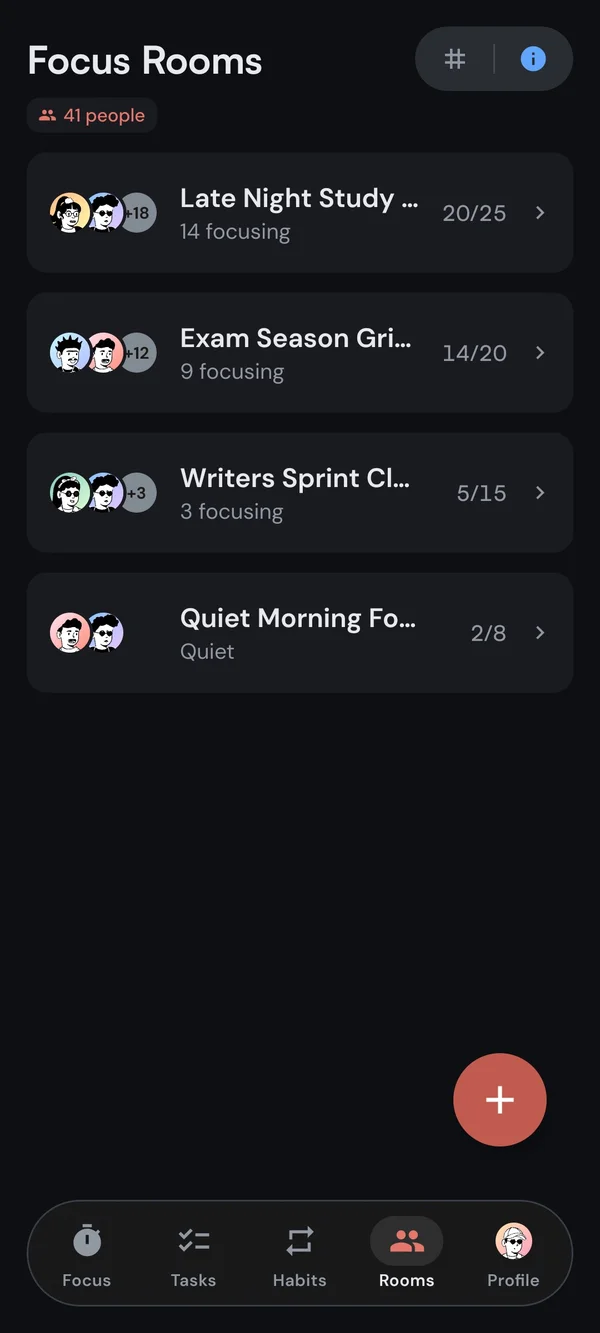
Pick a public room from the list, or open your own and share its code.
2. Start your timer
Your status flips to Focusing. Everyone in the room sees it, and you see theirs.
3. Stay present
Take breaks with the room, and keep the app open. Presence is the whole point.
Presence
Real status, real accountability
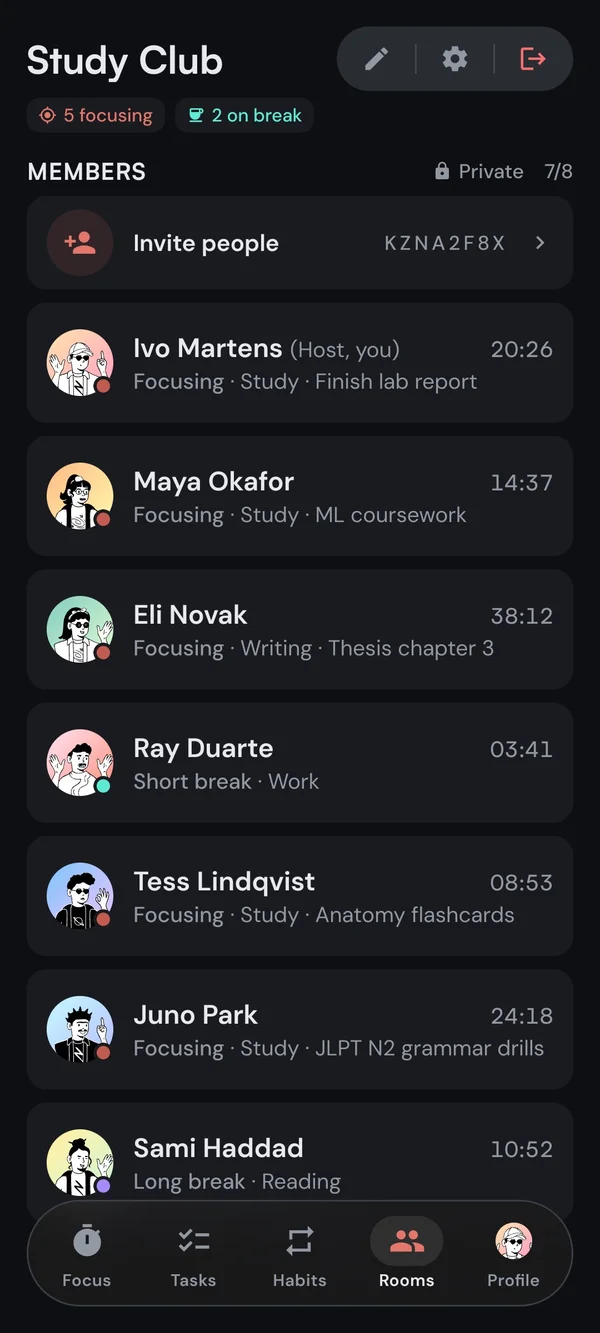
Everyone in the room shows one of six states, plus the tag they are focusing under, so you can see what the room is working on. No task names unless you choose to share them, no video, no audio.
- Six live statesFocusing, short break, long break, paused, away, or idle, with each person's timer ticking live: counting down, or up for anyone on the stopwatch.
- Your tag, not your taskThe room sees Study or Writing next to your name. The task title only if you turn on sharing.
- Gone after 15 minutesLeave Kaizen in the background for more than 15 minutes and the room removes you. The pressure only works if everyone is actually present.
FocusingShort breakLong breakPausedAwayIdle
Study with friends
Your own room, one code away
Public rooms are for company. Private rooms are for your people: a study group, a writing circle, a remote team doing a Pomodoro together. One person creates the room, free for up to 4 people or up to 50 with Premium, and everyone else joins for free with the code. Task sharing shows the room what each person is working on, straight from the task list.
- One code, everyone inYour room has an 8-character code. Share it in the group chat and friends join for free, no Premium needed on their side.
- Public or privateKeep the room to the people who have the code. With Premium, you can open it to anyone browsing.
- Show what you are onTurn on task sharing and the room sees "Chapter 4 notes" next to your tag.
- Host controlsRename the room, change its size, remove someone, or hand hosting to another member.
The research
What the evidence says, and what it doesn't
Body doubling comes out of ADHD coaching, and the largest survey of it we could find, 220 people in 2024, found that most were at least somewhat more likely to finish a task with someone else there. The same researchers noted that nearly every commercial tool sits in the high-interaction, shared-space corner of their map, that "not everyone always benefits from that approach," and that video calls can set off social anxiety. Nobody has proven body doubling makes you more productive. What people consistently report is that it makes work easier to start. That is the claim Focus Rooms are built on, and the only one we make.
Made for
Who Focus Rooms are for
Students grinding through exam season
Remote workers missing the office hum
Writers and creators pushing past a block
Anyone whose focus needs a little company
So far
Since launch, in numbers
Kaizen launched in January 2026. As of October 2026, over 7,000 people have signed up, and together they have logged nearly 29,000 hours of focus, over 4,800 of them inside a Focus Room with someone else.
Questions
The short answers
No, and there is no option to turn one on. Other members see your name, your status (focusing, on a short or long break, paused, away, or idle), your focus tag, and the task title if you chose to share it. There is no video, no audio, and no chat.
Yes. Joining any room and hosting a private one for up to 4 people are both free, on every platform and with no limit on sessions. Public rooms come from the list, private ones open with a code. Public rooms, rooms of up to 50, and sharing your active task are part of Premium, €3.99 a month or €39.99 a year with a 14-day free trial. Friends who join your room do not need Premium.
Between 2 and 50. The host sets the size: up to 4 in a free private room, up to 50 with Premium. Public rooms show how many people are focusing right now before you join.
Yes. Create a private room, free for up to 4 people or up to 50 with Premium, and share the 8-character code. Everyone who has it can join, free. Each person runs their own timer, so different session lengths in one room are fine, and someone on the stopwatch can sit next to someone doing 25-minute Pomodoros.
Your status shows the change, and if Kaizen stays in the background for more than 15 minutes the room removes you. That rule keeps the presence honest: everyone you see in a room is actually there.
Kaizen runs on iPhone, iPad, Android, the web, and Windows, with one account across all of them. A room follows the device you are using: open it on your laptop and the phone session disconnects, so you are never counted twice.
Pull up a chair
Join any room free, or host one for up to 4. Go public and bigger with Premium.